Introduction
Managing a large WordPress site is never a simple task—especially when your website attracts thousands of daily visitors or stores massive amounts of content, images, and user data. If your hosting environment isn’t optimized, your site can easily slow down, experience downtime, or even crash during traffic spikes. That’s why choosing the Best Hosting for Large WordPress Database is critical.
This article will guide you through everything you need to know: understanding high-traffic periods, optimizing WordPress for performance, selecting the right hosting type, managing server resources, and implementing strong security. We’ll also dive deep into Bluehost as one of the most reliable hosting providers for large WordPress databases.
By the end, you’ll know how to pick the Best Hosting for Large WordPress Database that keeps your site fast even during traffic surges.
Understanding High-Traffic Periods
High-traffic periods occur when a significant number of visitors access your site simultaneously. This could be due to:
Seasonal events (e.g., Black Friday, holidays)
Viral content or trending posts
Search engine ranking spikes
Product launches or announcements
For websites with a large WordPress database, these surges put massive pressure on your hosting resources—especially CPU, memory, and bandwidth. Without the best hosting for large WordPress databases, your site risks slowdowns, timeouts, and database connection errors.
How to Optimize WordPress for High Traffic?
Before diving into hosting types, it’s crucial to understand on-site optimizations that complement your hosting plan. Even the most powerful server will struggle if your WordPress site is poorly optimized.
Here are the key steps:
Optimize database queries – Use plugins like WP-Optimize to clean up post revisions, spam comments, and transient data.
Leverage caching – Page caching and object caching reduce repeated database queries, cutting load times significantly.
Enable image optimization – Compress and serve images in next-gen formats like WebP.
Use lazy loading – Load media files only when needed to minimize initial page weight.
Upgrade PHP and MySQL versions – Always use the latest stable versions for better performance and security.
Implement server-side optimizations – Configure your hosting environment for higher traffic tolerance (we’ll detail this later).
Together, these steps ensure that your WordPress database is leaner, faster, and capable of handling heavy traffic without breaking down.
1. Selecting a Managed WordPress Hosting for Large Sites
When selecting the Best Hosting for Large WordPress Database, consider how well the host manages traffic spikes, database queries, and memory usage.
A. Shared Hosting
Shared hosting is the most basic and affordable type of hosting. In this setup, your WordPress site shares server resources (CPU, memory, bandwidth) with dozens or even hundreds of other websites.
Pros:
Low cost, often less than $10/month.
Beginner-friendly with simple setup.
Cons:
Severely limited resources.
Risk of downtime if another site on the same server consumes too much bandwidth.
Not suitable for large WordPress databases or high-traffic sites.
???? Verdict: Avoid shared hosting if you run a big site. It simply doesn’t have the power or scalability needed.
B. VPS Hosting
A Virtual Private Server (VPS) offers a middle ground between shared hosting and dedicated hosting. With VPS, you still share a physical server, but you have dedicated virtualized resources (RAM, CPU, and storage) reserved for your site.
Pros:
More control compared to shared hosting.
Scalable resources—upgrade RAM or CPU as traffic grows.
Better performance for medium-to-large WordPress sites.
Cons:
Requires some technical knowledge to configure and maintain.
If not managed properly, performance issues may still arise.
???? Verdict: VPS hosting is a solid choice for growing WordPress sites with larger databases and moderate-to-high traffic.
C. Dedicated Hosting
Dedicated hosting means renting an entire server exclusively for your website. This is like owning your own high-performance machine in a data center.
Pros:
Full control over server resources.
Maximum performance and stability.
Best suited for sites with massive databases and heavy daily traffic.
Cons:
Expensive—can range from $150 to $500+ per month.
Requires advanced technical skills to manage unless you opt for managed dedicated hosting.
???? Verdict: Dedicated hosting is ideal for enterprise-level WordPress sites, eCommerce stores with thousands of products, or publishers with millions of monthly visitors.
D. Cloud Hosting
Cloud hosting distributes your website’s resources across multiple servers instead of relying on one physical machine. This allows auto-scaling, meaning your hosting plan adjusts in real time based on traffic spikes.
Pros:
Highly scalable—perfect for unpredictable traffic.
Pay-as-you-go pricing (only pay for what you use).
High uptime and reliability since the site is not tied to one server.
Cons:
Can be more expensive than VPS if traffic stays consistently high.
Some providers have complex billing structures.
If you expect unpredictable traffic, cloud platforms often provide the Best Hosting for Large WordPress Database performance with scalability.
???? Verdict: Cloud hosting is the best option for sites expecting sudden surges in traffic—such as viral blogs, eCommerce flash sales, or news sites.
2. Exploring Scalable Infrastructure for High-Traffic Management
When your WordPress site grows beyond a certain point, static hosting plans are no longer enough. You need scalable infrastructure—a hosting environment that adjusts resources dynamically to handle traffic surges.
Key elements of scalable infrastructure include:
Load Balancing: Distributes incoming traffic across multiple servers so no single server becomes overloaded.
Auto-Scaling: Adds extra server resources automatically during spikes (and scales down during low traffic).
Database Replication: Creates multiple copies of your database across servers to ensure faster queries.
High Availability (HA): Ensures your site remains online even if one server fails, by instantly switching to another.
Bluehost’s managed WordPress hosting often ranks among the Best Hosting for Large WordPress Database setups due to its scalability and uptime.
3. Choosing a Lightweight Theme for Your WordPress Site
A lightweight theme is essential for performance. Heavy, bloated themes with unnecessary scripts and animations can add extra seconds to page load time—which kills user experience and SEO rankings.
Why lightweight themes matter:
Faster loading speed → Better Google Core Web Vitals.
Less strain on server and database.
Compatibility with caching and optimization plugins.
Best lightweight WordPress themes for high traffic sites:
GeneratePress – Minimal and highly optimized.
Astra – Popular lightweight theme with many customization options.
Neve – Flexible and performance-focused.
Kadence – Fast and feature-rich without being heavy.
???? Tip: Always test your theme on Google PageSpeed Insights before finalizing.
4. Reducing the Size of Heavy Elements
Large files are one of the biggest bottlenecks for WordPress performance. Optimizing these elements reduces server load and speeds up database requests.
Images: Use compression tools like ShortPixel or Smush, and convert to WebP format.
Videos: Host on platforms like YouTube or Vimeo instead of directly on your server.
Fonts: Stick to system fonts or use only essential Google Fonts.
CSS & JS: Minify files and combine them where possible.
???? Every MB reduced means faster delivery and better server performance.
5. Utilizing a Content Delivery Network (CDN)
A CDN is a network of servers spread across the globe. Instead of loading your site from a single server, a CDN delivers cached content from the nearest server to the visitor’s location.
Benefits of using a CDN:
Faster load times worldwide.
Reduced strain on your main server.
Enhanced security with DDoS protection.
Better handling of sudden traffic spikes.
Popular CDN providers for WordPress:
Cloudflare (offers free CDN with advanced features).
KeyCDN.
BunnyCDN.
StackPath.
???? For large WordPress databases, using a CDN isn’t optional—it’s mandatory if you want global performance and uptime. Using a CDN is a must when you’re running a large site—and pairing it with the Best Hosting for Large WordPress Database setup maximizes global performance.
6. Avoiding Excessive Plugins
One of the most common mistakes WordPress site owners make is installing too many plugins. While plugins add functionality, they also introduce:
Extra database queries → Slower performance.
Security vulnerabilities → Outdated plugins are prime hacking targets.
Compatibility issues → Conflicts between plugins and themes.
Increased load times → Heavy plugins add scripts, CSS, and overhead.
Best practices for managing plugins:
Only install essential plugins (SEO, caching, security, backups).
Replace multiple plugins with all-in-one solutions where possible.
Regularly audit and remove unused plugins.
Choose well-coded, lightweight plugins from reputable developers.
???? Rule of thumb: Less than 20 plugins for high-traffic sites. If you’re running 40–50 plugins, it’s a performance red flag.
7. Optimizing Server Resources on Your WordPress Site
Even with the best hosting, you need to ensure efficient use of server resources. Let’s break it down:
A. CPU Usage
Your server’s CPU (Central Processing Unit) executes every PHP request, query, and background task on WordPress. High CPU usage = slow site.
How to reduce CPU load:
Enable page caching (with plugins like WP Rocket or W3 Total Cache).
Use object caching (Redis or Memcached) for database-heavy sites.
Limit cron jobs—disable WordPress’ built-in cron and use a server-level cron.
Optimize WooCommerce queries if running an online store.
B. Memory Management
Large WordPress databases consume a lot of RAM (memory), especially during high traffic.
Tips for better memory usage:
Increase PHP memory limit (e.g., 512MB+ for big sites).
Use a database cleaner plugin to remove junk data.
Avoid memory-hungry plugins (like some page builders).
Optimize MySQL configuration (tuning buffers and query cache).
C. Disk I/O Optimization
Disk I/O (Input/Output) affects how quickly your server can read/write files. If your database queries take too long, it’s often due to poor disk I/O performance.
How to optimize disk usage:
Use SSD storage instead of HDD for faster file handling.
Regularly clean up log files and temporary files.
Enable server-side caching (e.g., OPcache for PHP).
Archive old data instead of keeping everything in the live database.
D. Bandwidth Management
Bandwidth determines how much data your server can transfer to visitors. During traffic spikes, bandwidth bottlenecks can cause site downtime.
Ways to manage bandwidth effectively:
Use a CDN to offload static content delivery.
Enable image compression and lazy loading.
Limit hotlinking (others using your images on their sites).
Consider bandwidth add-ons or higher plans from your host.
8. Implementing Security Measures for High-Traffic Sites
A high-traffic WordPress site is also a high-value target for hackers. Large databases store user accounts, financial data, and sensitive content—which makes them vulnerable to attacks. Without strong security, even the best hosting setup can collapse under threats.
Here’s how to secure your site:
A. Proactive Monitoring
Monitoring helps you identify unusual activity before it becomes a full-blown attack.
Use uptime monitoring tools like UptimeRobot or Pingdom.
Track server load and suspicious login attempts.
Install a security plugin such as Wordfence or Sucuri for real-time alerts.
B. Firewalls and DDoS Protection
A Web Application Firewall (WAF) filters out malicious traffic before it reaches your site.
Cloudflare offers a free WAF with DDoS protection.
Bluehost also includes built-in firewall protection for managed WordPress hosting.
This is essential for blocking brute-force and botnet attacks.
C. Regular Updates
Outdated plugins, themes, and WordPress core files are a hacker’s favorite entry points.
Always update WordPress core immediately after releases.
Keep all plugins and themes updated.
Remove unused themes and plugins to reduce attack surfaces.
D. Secure Configuration
Server misconfigurations often open backdoors.
Disable file editing from the WordPress dashboard.
Use SSL certificates (HTTPS) across the entire site.
Restrict access to critical files like wp-config.php.
Implement strong passwords and two-factor authentication (2FA).
E. Content Delivery Network (CDN) for Security
Besides improving speed, a CDN also enhances security.
Blocks malicious traffic at the edge (before it hits your origin server).
Offers bot protection and rate limiting.
Reduces risks of data theft from your server.
???? Bottom line: A combination of proactive monitoring, WAF, updates, and a CDN ensures your large WordPress site stays protected while scaling for high traffic.
How to Manage High Traffic with Bluehost?
Bluehost is widely considered the Best Hosting for Large WordPress Database, particularly for businesses managing millions of monthly pageviews.
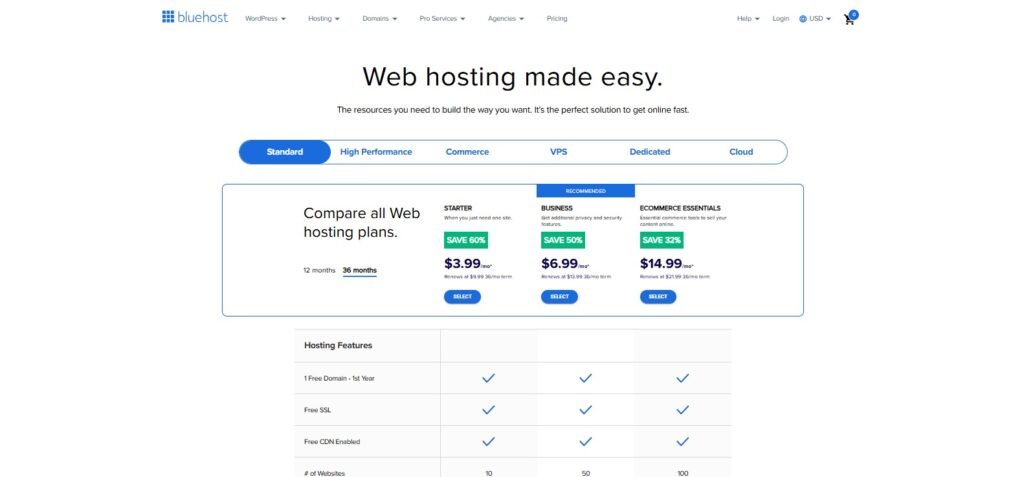
1. Bluehost as the Best WordPress Hosting for High Traffic
Optimized for WordPress: Bluehost provides custom server-level optimizations.
Scalability: With VPS, Dedicated, and Managed WordPress plans, you can scale as your traffic grows.
Built-in CDN and caching: Ensures faster delivery and reduced load on your server.
Strong security: Includes advanced DDoS protection, firewalls, and SSL.
24/7 Support: Essential for troubleshooting during traffic spikes.
???? Bluehost is especially attractive for businesses, bloggers, and eCommerce owners who expect rapid traffic growth and need a one-stop hosting solution.
2. Step-by-Step Guide to Optimizing High Traffic with Bluehost
A. Step 1: Upgrade to Bluehost Managed WordPress Hosting
Shared plans aren’t enough for large databases. Switch to a Bluehost Managed WordPress plan or VPS/Dedicated hosting for more power.
B. Step 2: Enable Bluehost Free CDN for Faster Load Times
Bluehost offers free CDN integration with Cloudflare. This reduces server load and speeds up content delivery globally.
C. Step 3: Implement Bluehost’s Advanced Caching Solutions
Enable server-side caching and configure caching plugins. Bluehost provides built-in caching to handle spikes effectively.
D. Step 4: Utilize Bluehost Auto-Scaling Feature
During unexpected surges, Bluehost’s infrastructure automatically allocates additional resources to keep your site online.
E. Step 5: Secure Your Site with Bluehost Advanced DDoS Protection
Activate firewall and DDoS mitigation features to prevent attacks that could bring down your high-traffic site.
Final Thoughts
Running a WordPress site efficiently starts with choosing the Best Hosting for Large WordPress Database, followed by smart optimization and security. It’s about combining the right hosting environment with optimization strategies, scalable infrastructure, and airtight security.
Here are the key takeaways:
Shared hosting is not enough—choose VPS, Dedicated, or Cloud hosting for large databases.
Optimize your WordPress setup—lightweight themes, CDN, caching, and plugin management.
Secure your site with firewalls, monitoring, and regular updates.
Bluehost stands out as one of the best solutions for large WordPress sites thanks to scalability, performance tools, and security features.
If your site is growing rapidly, don’t wait for downtime or performance issues to hit you first. Take action today: upgrade your hosting, implement the optimizations outlined here, and ensure your WordPress site is ready for future growth.
???? Call to Action: Ready to scale your WordPress site to handle millions of visits? Explore managed WordPress hosting plans with providers like Bluehost to keep your site fast, secure, and unstoppable.
FAQs
Q1. Why can’t I use shared hosting for a large WordPress database?
Shared hosting has limited resources and puts your site on the same server as dozens of others. Large databases and high traffic will overwhelm shared servers, leading to downtime and poor performance.
Q2. Which hosting is best for WordPress sites with millions of monthly visitors?
For enterprise-level traffic, Dedicated Hosting or Cloud Hosting with auto-scaling is the best choice. Bluehost, AWS, and Google Cloud are strong options.
Q3. How do I know if my WordPress site needs VPS hosting?
If you experience frequent slowdowns, memory errors, or downtime during traffic spikes, it’s time to move from shared hosting to VPS.
Q4. Does a CDN help with large WordPress databases?
Yes. A CDN reduces the strain on your main server by caching and delivering static files from multiple global servers. It speeds up content delivery and reduces bandwidth usage.
Q5. What are the best lightweight WordPress themes for high-traffic sites?
GeneratePress, Astra, Neve, and Kadence are excellent lightweight themes designed for speed and scalability.
Q6. How can I reduce CPU usage on a busy WordPress site?
Enable caching, optimize queries, use object caching (Redis/Memcached), and disable unnecessary cron jobs.
Q7. How does Bluehost handle high-traffic WordPress sites?
Bluehost provides managed WordPress hosting with CDN integration, caching, auto-scaling, and advanced DDoS protection—ensuring stability during heavy traffic surges.
Q8. Is VPS hosting enough for WooCommerce stores?
For medium-sized WooCommerce stores, VPS hosting works well. However, very large stores with thousands of products should use Dedicated or Cloud hosting.
Q9. How often should I optimize my WordPress database?
At least once per month. Regular optimization removes unnecessary data like post revisions, spam comments, and transients that slow down queries.
Q10. What’s the single biggest mistake site owners make with hosting?
Choosing the cheapest option (shared hosting) for sites that actually need scalable solutions. This often results in downtime, lost customers, and SEO penalties.



